Tanzu Intelligent Assist
VMware B2B Domain
I worked on project as lead designer. I collaborated with 1 Designer, 2 Front End Developers, 1 Back End Developer and 1 Product Manager.
July 2023 - Sept 2023

What is Tanzu Hub ?
VMware Tanzu Hub is a multi-cloud management solution that unifies cost, performance, configuration, and delivery automation in a single platform with a common control plane and data model for any cloud, platform, tool, and persona.
INTRODUCTION
VMware Tanzu Hub today is encumbered by information overload. Users struggle with context switching while interacting with the portal. In the context of reducing cognitive load, there is a need for a robust and intelligent assist solution.
PROBLEM STATEMENT
What is Tanzu Intelligent Assist ?
Tanzu Intelligent Assist, integrated within Tanzu Hub, elevates the user experience by employing natural language search capabilities, providing faster access to cloud assets, and simplifying the process of extracting connected data without deep technical know - how.
OVERVIEW
VISION
Key Features of Tanzu Intelligent Assist
The UX paradigm needs to shift to reducing cognitive load, providing content in order to drive consumption and allowing users to explore and gain an understanding of their environments, all through seamless interactions and minimal context - shifting.
Intuitive Navigation
After searching, users are automatically directed to the relevant UI sections, allowing for deeper data exploration.
Natural Language Search
Easily query the core inventory of cloud assets and their metadata.
Infrastructure Co-Pilot
Seamless integration with generative features like the infrastructure Co-Pilot.
Knowledge Base Access
Directly connect with documentation and information relevant to user queries.
NEED
Benefits of Intelligent Assist
Efficiency
Dramatically cuts down the search time within the Hub.
Comprehensive Insights
Summarizes data from structured data stores and external resources.
User-Friendly
Eliminates the need to understand intricate query languages or GraphQL details.
DEFINING PROBLEM
How it works ?
Query Processing
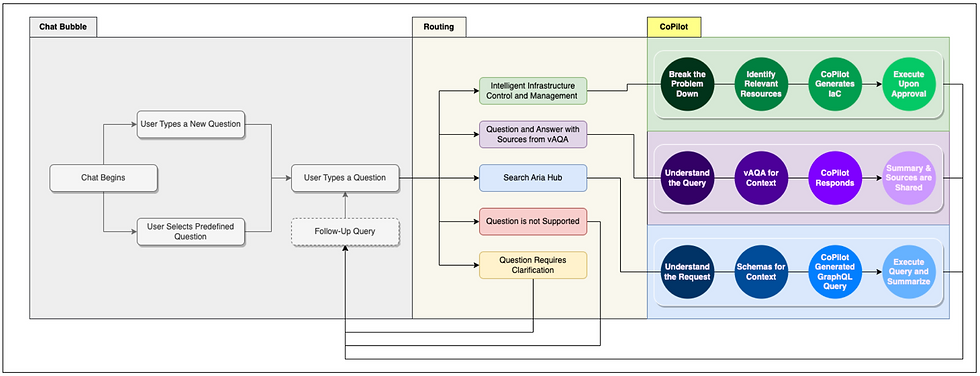
The query is processed, understood, and sometimes clarified using Azure OpenAI. This leads to the generation of GraphQL queries, further searching of documentation, or seeking additional user input.
User Interaction
Begins with the user sending a query via Tanzu Hub.
Error Handling
If any unexpected situations arise, the system identifies the error, analyzes it, and notifies the user with either a solution or a recommended action.
Data Retrieval and Presentation
Post-query generation, the system executes the query, retrieves the relevant data, and summarizes it for easy comprehension. Users are also provided direct links to the data they seek.
Data Flow Chart for Intelligent Assist
Flow chart to explain the input-output model of query processing and response generation. It is designed to assist users by providing context-aware suggestions as they write, helping to speed up the daily task completion process.
VMWARE TANZU HUB
To address cognitive overload and context switching, Tanzu Hub introduces and Intelligent Assist solution. This will empower users to navigate effortlessly, collaborate effectively, and innovate with ease, ultimately reducing cognitive load and fostering a more user-friendly platform."
VISION STATEMENT
Final Design
Presenting an overview of the final design, it incorporates essential screens that outline the conclusive user journey. These screens have been carefully created to capture the core of the user experience, ensuring a smooth and purposeful interaction. Each screen serves as a deliberate step in guiding users through a polished and optimized journey, presenting a unified and visually engaging representation of the ultimate design vision.
OVERVIEW


Complicated workflows with almost no IA in place
Most experiences over time became a kitchen sink of complex controls, with unactionable CTAs.
No ingress point for newly launched features
As IoT CMP evolved, new functionalities were added to the platform. But Dashboard didn't provide any space for new cards.
Breakdown of the Problem
Dated User Experience
IoT CMP team followed dated UI paradigms from an old tech stack, with critical usability issues.
Disjointed Experience
Information is siloed and didn't work together to give meaning & insight. Most of the cards display null values.
Design Process
In the Tanzu Hub team, we adhere to a structured process to achieve our goals. The design process is composed of four main phases: Discover, Align & Plan, Execute, and Release. Each phase plays a crucial role in guiding our efforts and ensuring a methodical approach to designing and delivering successful outcomes.
PROCESS

Design Process Checklist
The following checklist serves as a valuable tool for keeping track of the project's progress.
PROCESS

User Journey
In Tanzu Hub, our services cater to diverse personas such as Application Developer, Application Operator, Platform Engineer, Security Analyst, Cloud Admin, and more. For this specific project, our primary focus has been on enhancing the Cloud Admin Journey.
PROCESS
Cloud Admin Responsibilities
-
Deploy, manage, and monitor cloud infrastructure components
-
Implement and enforce security measures to safeguard cloud resources and data
-
Use Infrastructure as Code (IaC) tools for automated deployment
-
Participate in cross-functional teams for projects involving cloud resources
-
Implement and manage backup strategies for data and applications hosted in the cloud.

Taking a sneak peek
Through a thorough comparative analysis, we gathered valuable insights that guided and influenced our approach to the project.
COMPARATIVE ANALYSIS


COMPARATIVE ANALYSIS
Insights Gathered / learnings
-
Chat should be easy to access anywhere.
-
Full-page chat interface is common, and to keep people focused.
-
Long loading time could be issue.
-
User might ask unrelated questions, 'How far is the sun'?
-
Allow people to modify, change the conversation.
-
Sometimes answer could be multiple and complicated how do we provide answer without overwhelming users?
Prompts Category
In our interaction with Generative AI, we recognized the significance of prompt suggestions. A 'prompt' represents the user's input or query to start a conversation with the model. Once prompts are identified, we create a script to track the user journey effectively. Script created after identifying prompts.
PROCESS

Deconstruction
"The design comprises two integral parts. Firstly, the Intelligent Assist offers context-aware assistance, providing users with intelligent support such as answering questions, offering recommendations, automating tasks, and delivering information.
Secondly, the Co-Pilot is an AI-powered code completion tool designed to assist developers by offering code suggestions and autocompletions within their integrated development environment (IDE)."
PROCESS

Intelligent Assist


Co - Pilot
Design Breakdown
Intelligent Assist contains many design components. All these components were created in an iterative process.
PROCESS

Ideate, Validate and Recreate
In the initial ideation phase, we worked on a Miro board with numerous quick ideations. Following the Low-Fidelity (Lo-Fi) ideation, we incorporated existing design components to present our ideas. Over time and through an iterative process, we reached the final design stage."
PROCESS


Assitant Widget Exploration
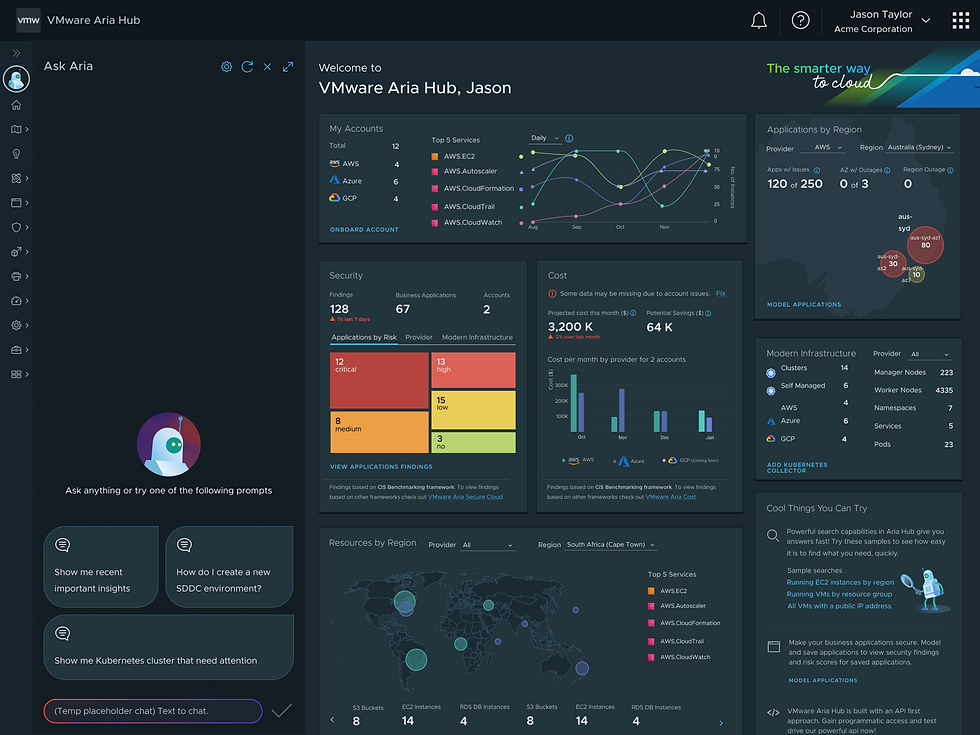
We designed a widget on the homepage to serve as the user's entry point. Our objective was to enhance the discoverability of the widget, especially since we were introducing a new feature on the platform."


Side Panel Exploration
After the user initiates interaction with the widget, prompts are designed to automatically guide them to the side panel. This approach is adopted to leverage users' familiarity with conventional conversational chat bots.


TAKE AWAYE
Widget Vs Left Panel
Throughout the iteration phase and feedback sessions, the prominence of a widget design on the homepage was evident. However, it became apparent that the chat widget was not a scalable solution, as it obscured many features and functionalities of the platform. In response, a new user flow was crafted by bringing the side navigation upfront to enhance accessibility and feature visibility.

Chat Placement
We identified the need for an additional global entry point, allowing users easy access to chat assist. The placement of the chat icon underwent shifts based on business requirements. The primary criteria were to ensure this component's visibility and scalability across various products.


USER JOURNEY
Day 0 - Onboarding
User Story: As a Cloud Admin, I want an overview of the platform environment. Security and outage concerns are my top priorities.
The Intelligent Assist responded by presenting a system preview as requested and offered prompts for further exploration of detailed information.

USER JOURNEY
Day 1 : Opening and Context Change
User Story: As a Cloud Admin, I want an overview of what happened in Tanzu Hub since I last logged in.
The Intelligent Assist delivers data on security vulnerabilities identified across all apps. It offers prompts for users to delve into the exact location of each security issue.

USER JOURNEY
Day N : Auto Navigation
User Story: As a Cloud Admin, I want to check all the vulnerabilities identified in the app cloud.
The Intelligent Assist efficiently navigates the user to the specific security issue, providing assistance in understanding and addressing the vulnerabilities

USER JOURNEY
Day N : Co - Pilot
The Intelligent Assist seamlessly navigates the user to the editor mode, highlighting the specific line of code. It not only points out the issue but also provides recommendations for code changes to address the identified issue

VISUAL
Component Libarary
The project unfolded in multiple phases. Initially, we developed the conversational AI and integrated the components into our existing platform. Progressively, we iteratively added new functionalities and consistently enhanced the user journey throughout the entire process


USER JOURNEY
Success Metrics
Methodology
-
Generate responses from the Gen AI feature for a variation of the system message and prompt (containing pre-defined text and event definition) to yield the best-performing a single static system message and a dynamic prompt skeleton.
-
Evaluate the responses against the evaluation criteria to understand what parameters yield the best-performing output.
-
Calculate the percentage of responses that meet all of the evaluation criteria.
Methodology
Correctness
The response must be accurate and effective for optimizing the cost of the specified AWS service. It must be grounded in truth. Research style, we must have some reference to a link online that states the same. (only this one was chosen for Phase 1)
Completeness
The response must provide at least 1 and a maximum of 5 best practices.
Actionability
The response must be actionable and not philosophical
Relevance
The response must be relevant to the prompt (to the specific AWS service, region, and usage type specified in the input)
Success criteria
The Gen AI feature is considered to be successful if it meets the following criteria:
-
The percentage of responses that meet all of the evaluation criteria is greater than 70%.
-
The Gen AI feature does not recommend or direct the user to any other analytics or cloud management tools.
-
The Gen AI feature does not provide wrong information (inaccurate) more than 30% of the time.
-
The Gen AI feature must be actionable in its responses at least 50% of the time.
-
The Gen AI feature provides up to 5 recommendations of best practices.
-
The response must be a valid Python list, such as a list of strings or a dictionary of key-value pairs.
Experiment 1
Data - Real Tanzu Hub customer data for existing customers.
Criteria for success - 70% correctness.
Platform used: InstaML Loop.
Annotators: Finops Experts from VMware's Cloud Business Office.
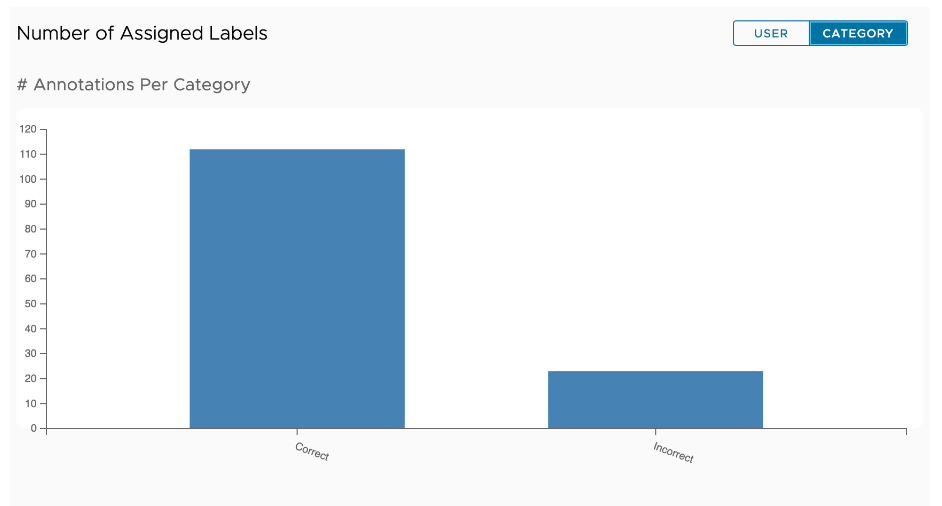
Achieved outcome - 83% correctness.
Status: Complete
Experiment 2
Data - Real CloudHealth (as a cloud consumer) data for itself. We have considered a diverse set of 50 AWS services.
Criteria for success - Undetermined
Platform used: InstaML Loop.
Annotators: Finops Experts from Cloudhealth Engineering and Cloud Business Office
Achieved outcome - 70% correctness.
Status: Ongoing

Experiment 3
Data - Real customer data with new product-specific prompts implemented
Criteria for success - 70% correctness
Platform used: InstaML Loop.
Annotators: Finops Experts from Cloudhealth Engineering
Achieved outcome -73% correctness
Status: Ongoing
